Let’s talk about something all of us newsletter creators can agree on: the grind to consistently produce engaging emails is real. It can lead to burnout before you even hit “Send” on your next edition. But, a lot of this can be automated without losing your personal touch.
Automating key parts of your email newsletter isn’t just a time-saver, it’s a business-growth hack.
I was inspired by a ConvertKit article on this topic, and I expanded on it quite a bit and added a bunch of personal examples and additional points. Just one of these tips could save you hours ever week.
Quick Navigation
- 1. Seamlessly Grow Your List
- 2. Engage Immediately with Automated Welcome Sequences
- 3. Smart Segmentation with Link Triggers
- 4. Curated Content on Autopilot
- 5. Evergreen Email Sequences
- 6. Weekly Round-ups? Automate It
- 7. Pitch Paid Products, Automatically
- 8. Re-engage Cold Subscribers
- 9. Update Your CRM Automatically
- 10. Set Up Analytics Tracking
- 11. Scale Faster with Facebook Ads
- 12. Automate List Cleanup
- 13. Maximize Engagement with These Quick Hacks
- Wrap-up: Why This Matters
1. Seamlessly Grow Your List
Expanding your email list can be automated across multiple channels. Here’s a few ways to set it up once and only once:
- Tap Into Cross-Promotions: Use ConvertKit’s Creator Network to get your newsletter in front of new, relevant audiences through creator recommendations. I’ve said before that this one feature makes ConvertKit worth it for me. Some other email platforms have similar programs.
- Engage in Collaborations: There are several people who include my Amazon Influencer Guide in their auto-responder sequences. As a result, new people are constantly being introduced to me and my content!
I’ve also played around with SparkLoop, which is kind of like a way to pay for new subscribers in your niche from other newsletters. It was moderately effective and I would do it again in the future.
2. Engage Immediately with Automated Welcome Sequences
You’ve hooked a new subscriber—don’t let them drift away. Use a welcome sequence to onboard them, introduce your best content, and show what your newsletter is all about.
At ConvertKit’s Craft and Commerce Conference (wow that’s a mouthful) this past June, this was my #1 biggest takeaway. Welcome sequences increase engagement dramatically.
In my email projects, the welcome email is where I set the stage for what’s coming. It’s like your first impression—it needs to be strong. Automate this once, and it’ll work for you round-the-clock.
Actionable insight: Start with a killer intro, share 2-3 top posts, and then nudge them towards your social profiles or wherever you’re active. These first few interactions matter.
My favorite email platforms are ConvertKit and MailerLite. They both have generous free plans and lots of automation features. You can see my full breakdown here.
I include Beehiiv in that breakdown because they are also very popular. My podcast co-host Brooks Conkle really loves them and shares why here.
3. Smart Segmentation with Link Triggers
One size rarely fits all. Segmenting your audience based on interests gives them a personalized experience—without more work on your part.
Did you know that most of my emails at Weekend Growth are NOT to the entire list? Yep, I segment, a lot!
Kaitlin on our team wrote a really good deep dive on segmentation that you might want to read.
In ConvertKit, use link triggers to tag subscribers based on what they click. From there, you can send hyper-relevant emails that hit their specific needs.
Why it matters: Personalization drives engagement and increases revenue, period.
4. Curated Content on Autopilot
If you’re running a newsletter that relies on curated content (like industry news, interviews, or even job postings), having to hunt for relevant material week after week is draining.
Set up a system to scrape your favorite sources via an RSS reader like Feedly, and funnel it into a Google Sheet using Zapier. Now, when it’s time to create content, you’ve got everything in one place, ready to be copy-pasted and shipped.
Real-world example: I use this method with niche sites to grab content ideas and prepare for the weekly Niche Pursuits News podcast. This ensures that even when I’m slammed, there’s always fresh content on deck. Which is exactly the situation right now, with Q4 always being our busiest at 201 Creative.
5. Evergreen Email Sequences
In my opinion, an evergreen sequence is pure gold. You can write an entire year’s worth of content, and every new subscriber will get value from day one, no matter when they join. It keeps your engagement strong without needing to scramble for fresh material every week.
Evergreen sequences are perfect if you’re recycling high-quality content—whether it’s a list of resources, how-tos, or even a series of deep-dive articles. This one’s a set it and forget it solution.
This is the biggest newsletter opportunity for HCU-hit sites. Have ChatGPT help you create a good order and flow to your content and then set up an evergreen email sequence.
Get expert insights on expanding your niche site beyond traditional blogging in this free e-book.
6. Weekly Round-ups? Automate It
Got a blog? You probably already know that sending a digest of your most recent posts can be an easy, high-value newsletter style.
Instead of spending time manually compiling this, let automation do the heavy lifting. Tools like ConvertKit’s RSS-to-email integration allow you to send a round-up of your latest posts with zero effort. Set it up once, and it’ll populate each week automatically.
Thomas Smith also talked about a similar but different method he is using to do this for his local newsletter a few weeks back on the podcast.
Bonus tip: Don’t forget to add some personal commentary before it goes live—because it’s still all about that connection.
7. Pitch Paid Products, Automatically
Free newsletters are great, but they’re also a perfect channel for promoting your paid products.
Automate pitches using a sequence that softly sells your paid newsletter, courses, or digital downloads. And yes, you should have some or all of these available.
Do you know how easy it is to create a paid digital product from all of the content on your website?
You’ll be surprised at how well a low-key nudge—delivered at just the right time—works.
8. Re-engage Cold Subscribers
Cold subscribers hurt your open rates and email deliverability.
Set up an automated re-engagement campaign to clean your list while giving disengaged readers a chance to re-opt-in. If they don’t respond? It’s time to remove them from your list
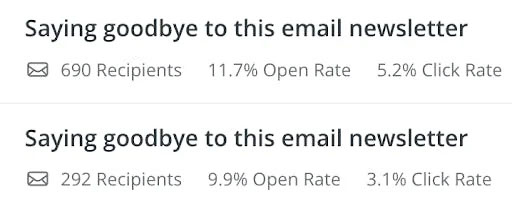
We do it all the time for our email newsletters. As a matter of fact, we just finished our re-engagement campaign over the weekend for Weekend Growth. Got rid of a bunch of un-engaged subs.
This keeps your email list fresh and lean, so you’re not paying for deadweight on email platforms, which charge based on subscriber count.
9. Update Your CRM Automatically
If you’re serious about list management, keeping subscriber data updated in a CRM (like HubSpot) is crucial.
Luckily, you don’t have to do this manually. Use Zapier to sync data between your email provider and your CRM so you can track user preferences, purchase behavior, and more.
10. Set Up Analytics Tracking
The emails you send can be more than just a communication tool—they can also give you rich data on your audience.
Use Google Analytics and your email provider together to track how much traffic your emails are driving to your site. Using UTM parameters can help refine the data even more.
This helps you refine your content strategy for both the newsletter and the website.
I’ll be sending out my monthly Amazon Influencer recap, with tips for maximizing Q4. Get signed up to receive the email HERE!
11. Scale Faster with Facebook Ads
I know Facebook Ads aren’t everyone’s cup of tea, but when done right, they can be a fast-track solution to growing your list.
I’ve successfully used Lead Ads in combination with email automation for rapid growth—targeting audiences directly in their Facebook feed, capturing their email with a lead magnet, and instantly plugging them into my autoresponder sequence.
We then feed these leads into our email CRM with Make. Auto-pilot.
Pro tip: Keep testing! Different copy, different audiences, and even small design tweaks can dramatically lower your cost per lead. Right now, I’m getting leads for less than $0.50 in some campaigns.
12. Automate List Cleanup
List hygiene is critical for keeping your email performance high. Use automations to remove inactive subscribers from your list and keep things streamlined.
I’ve also talked recently about the need to reduce your bounce rate through tools like Bouncer, and how much it helped our new newsletter The Slice.
It’s better to have a smaller, highly engaged list than a large, uninterested one.
13. Maximize Engagement with These Quick Hacks
Once your automations are running, optimizing engagement is the next big win. Here are four simple yet powerful tweaks to get your subscribers opening, reading, and clicking more often:
- Make Your Emails Easy to Scan: Instead of walls of text, use bullet points, bolded text, and headers. Your readers—especially on mobile—are far more likely to engage when content is quick and easy to digest.
- Test Your Subject Lines: Your subject line can make or break your open rates. Run A/B tests with different styles—like personalized, emoji-filled, or FOMO-based—and track what works best for your audience.
- Don’t Waste Unopened Emails: If a subscriber doesn’t open your email the first time, give it a second chance. Resend it with a new subject line, and you’ll see a big boost in your overall open rate.
Wrap-up: Why This Matters
The name of the game here is efficiency. Automations allow you to scale without sacrificing quality, freeing you up to focus on what truly matters—creating content that connects with your audience.
Building a newsletter doesn’t have to be a grind. Set these up once, tweak them as you go, and watch your newsletter grow without requiring hours of your week.
P.S. If you’re looking for a community of like-minded individuals doing email marketing every day, give the Niche Pursuits Community a try. Use the code “weekendgrowth” to get your first month for just $1. See you there!