
Let’s dive deep into something foundational but often overlooked: performing an internal link audit.
Internal links are important for SEO. But, even if you’re not optimizing for Search, internal links are very important.
They are the #1 way to increase Average Pages per Visit, which can really improve your Ad RPM.
So don’t sleep on them, either way.
I’m going to walk you through a step-by-step guide to auditing your internal links using Link Whisper. If you don’t have this plugin yet, make sure to check it out!
Quick Navigation
Why Internal Links Matter Beyond SEO
Before we jump into the technicalities, let’s clarify why internal linking matters—and not just for SEO:
- User Experience: Internal links help guide users to relevant content, making their experience more seamless and intuitive.
- Increased Page Views: When you guide users to more content within your site, they spend more time there. If you monetize via ads, more page views mean more ad impressions, increasing your RPMs.
- Indirect SEO Benefits: Yes, SEO still works in many niches, and internal links play a part by distributing page authority and keeping users engaged. We know Google tracks user engagement metrics thanks to the data leaks, so improving these can indirectly boost your rankings.
Step 1: Install and Set Up Link Whisper
Start by installing Link Whisper on your WordPress site. Once installed, head to your WordPress backend and navigate to the Link Whisper section.
Run a Link Scan: Always begin by running a Link Scan to ensure that you’re working with the most up-to-date internal link data. This is particularly important if you’ve added content recently or if other team members have made updates.

Step 2: Using the Links Report to Audit
Now that your site has been scanned, it’s time to dig into the data. Head to the Links Report section, which provides a wealth of insights. You can export two types of reports here:
- Summary Export (CSV)
- Detailed Export (CSV)

Let’s start with the Summary Export.
Summary Export – What to Look For
Once you’ve exported the summary report, upload it to Google Sheets for easy sharing and filtering. Here’s the data you’ll focus on:
- Inbound Internal Links: These show how many internal links point to each page.
- Outbound Internal Links: These show how many links each page has pointing to other internal pages.
- Orphan Pages: Pages with zero inbound internal links. These are critical because they’re not being linked to from any other page on your site. Google won’t easily find them, and users likely won’t either.

Step 1: Orphan Pages
Identify pages with zero inbound internal links and fix them. These orphaned pages aren’t getting the visibility they deserve, and a few internal links can turn that around.
Step 2: Pages with Few Internal Links
Next, filter your summary report to identify pages with only 1-3 internal links. These are your second priority after orphan pages. Adding more internal links to these can enhance their visibility.
For example, if you find a post with just one or two links but it’s important to your strategy, make a note to link to it from related content.
Step 3: Categorize and Cross-Link
Now, let’s zoom out and look at your site’s structure by category. Filter your report by category or content silo.
- Are there clusters of related content that aren’t linked together?
- Could your broader, more general articles link to more specific ones?
For example, I have 5 posts under a “Side Hustles” category, but some are well-linked and others are not.

Create internal links to bridge those gaps. Cross-linking posts within the same category strengthens topical relevance and user navigation.
Want to create multiple revenue streams for your site? The free Flywheel Publishing e-book shows you how.
Step 3: Dive into the Detailed Export
The Detailed Export provides granular insights into your internal links, including the anchor text used in those links. This data is critical for optimizing both user navigation and SEO.
Analyzing Anchor Text
When reviewing anchor text, focus on ensuring it’s clear, relevant, and actionable for the user. Here’s what to focus on:
- Irrelevant or weak anchor text: Check whether the anchor text aligns with the destination page’s content. Avoid vague phrases like “click here.” Instead, use descriptive, informative anchor text that tells the reader exactly what they’ll find when they click.
- Anchor text optimization: For instance, in my Beehiiv vs. MailerLite article, I found internal links coming from related posts like MailerLite vs. ConvertKit and MailerLite vs. Beehiiv vs. ConvertKit. The anchor text “Beehiiv vs. MailerLite” is highly relevant and targeted, as it directly reflects the content of the linked article. Another link used the phrase “far better than Beehiiv,” which provides good context for users comparing the two platforms.
- Improving outbound links: In my Beehiiv vs. MailerLite article, I also identified outbound internal links with anchor text like “do more than just send emails” and “learn more here.” While functional, these could be more compelling. For example, instead of “learn more here,” a stronger anchor text would be “see the full comparison between ConvertKit and MailerLite here” to drive more engagement and guide users through related content.
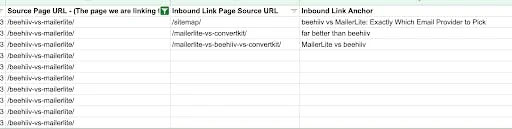
By reviewing and refining your anchor text, you ensure both the internal linking context and clickable text are optimized for user engagement and content relevance.
Outbound Links – Maximizing Page Views
Just as important are your outbound internal links—the links inside a post that point to other pages. Weak call-to-action anchor text like “learn more here” doesn’t tell the user what they’re clicking into. Instead, use descriptive anchor text like “see the differences between MailerLite and Beehiiv here” to encourage engagement and provide clarity.

I’m publishing more and more on Medium! Follow along to see everything I share.
Step 4: Implement the Changes
Now that you’ve identified areas to improve, it’s time to take action.
- Add Internal Links: For orphaned or under-linked pages, use Link Whisper’s suggested links feature to quickly find relevant internal linking opportunities. You can also manually add links by searching for specific keywords.
- Example: If one of your “Medium” posts is orphaned, you can quickly link it to other content that mentions Medium.
- Refine Anchor Text: As you add internal links, don’t forget to optimize the anchor text. This will help both users and search engines better understand the context of the linked content.

You can do all of this really quickly and easily in Link Whisper!
Final Thoughts
Auditing and optimizing your internal links is a powerful way to improve site performance, boost SEO, and increase user engagement. Whether you’re focused on driving traffic, increasing RPMs, or improving SEO, internal linking should be part of your regular maintenance routine.
Key Takeaways:
- Prioritize fixing orphaned pages and under-linked content.
- Use anchor text strategically for SEO and user clarity.
- Regularly audit your internal links to ensure your site is optimized for both users and search engines.
I hope this guide gives you everything you need to conduct a thorough internal link audit. Have questions or need more help?
We provide this service at 201 Creative. Or, just use Link Whisper to do it yourself. And, you can get Link Whisper for $25 off here at this link!